Cantonese Transcription & Live Translation
SonicMeet captions meetings spoken in Cantonese and translates live captions to or from natural written Cantonese — on Zoom, Microsoft Teams, Google Meet and other meeting platforms, in the browser or in their desktop apps.
Yes — SonicMeet transcribes and translates Cantonese.
Select Cantonese as the source to caption a meeting spoken in Cantonese, or select it as the target to read another language in natural written Cantonese. Both directions are available since Extension 1.4.1 and Windows 1.2.1.
Free · Chrome & Edge · No download, no bot in your meeting
Free · macOS 14.2 or later · Apple Silicon & Intel
Free · Chrome & Edge · No download, no bot in your meeting
SonicMeet runs on desktop — open this page on your computer to install.
Prefer a desktop app? Get SonicMeet for Windows →Joining from a browser instead? Get the extension →Also available as a desktop app for Windows and Mac →We need the client's sign-off on this proposal by next Friday.
呢個方案下星期五之前要收到客戶確認。
No problem — I'll follow up with them this afternoon.▍
冇問題,我今日下晝就同佢哋跟進。
示範之前,我哋先過一次第三季嘅路線圖。
Let's walk through the Q3 roadmap before the demo.
客戶想下個星期睇新版嘅示範。▍
The client wants to see a demo of the new version next week.
Cantonese ↔ English, Mandarin, Japanese, Korean and 57 more languages — either direction, live.
See Cantonese translation in action
A short walkthrough of live Cantonese captions and translation in a real meeting.
Cantonese support at a glance
Exactly what works today — no marketing fog.
Transcribe meetings spoken in Cantonese
Choose Cantonese (粵語) under Source language to caption Cantonese speech live, then keep the original text or translate it into any supported target language.
Translate any meeting into Cantonese
Live captions are translated into Cantonese from any of SonicMeet's 62 source languages — English, Mandarin, Japanese, Korean and more.
Natural written Cantonese
Output is written Cantonese in Traditional Chinese characters — 係, 唔, 嘅, 有冇 — the way Cantonese speakers actually phrase things.
Original and Cantonese, together
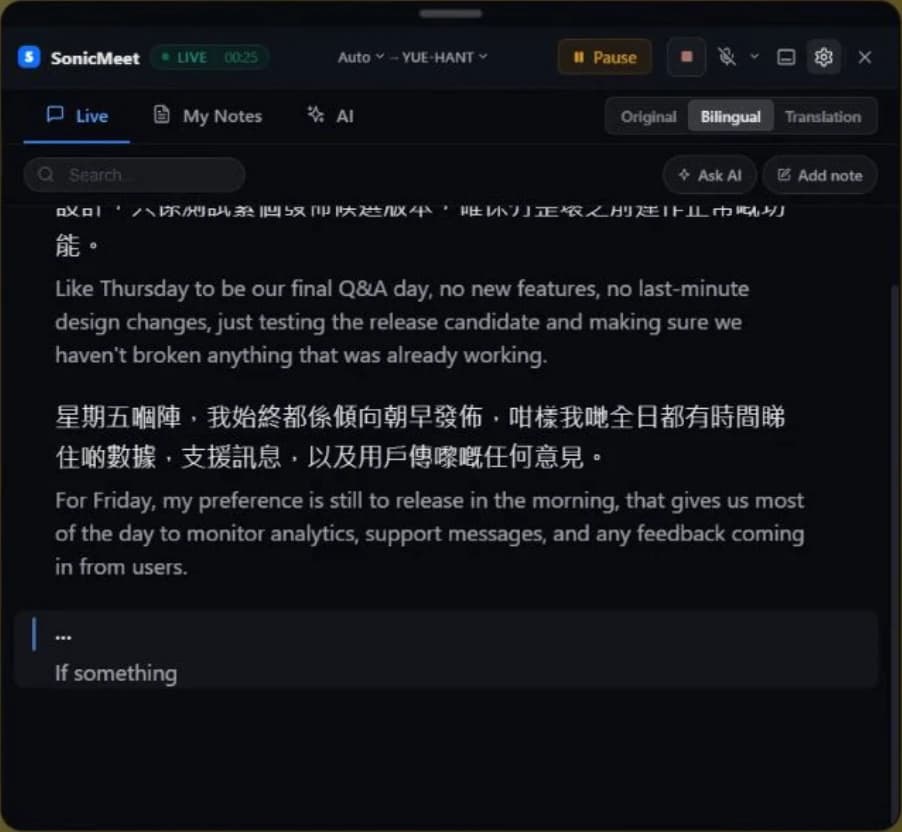
Bilingual display shows each caption's translation and original together — translation first by default, and you can swap the order — so you follow the speaker and the meaning at once.
Zoom, Microsoft Teams, Google Meet and more
The Chrome/Edge extension captions any meeting that runs in a browser tab — Zoom, Teams, Google Meet or any other web-based platform. The Windows and Mac app also covers desktop meeting clients.
Automatic Cantonese detectionNot yet
Auto Detect hears spoken Chinese as Mandarin — it does not yet tell Cantonese apart. Cantonese meetings need the source language set by hand.
Cantonese captions on Zoom, Microsoft Teams & Google Meet
Setup guides for the big three — SonicMeet works the same way in other meetings, in the browser or on desktop.
Zoom
Translated captions in Zoom without host settings, add-on plans or a bot joining the call.
Set up for ZoomMicrosoft Teams
Live translated captions in Teams meetings — in the browser or the Teams desktop app on Windows and Mac.
Set up for Microsoft TeamsGoogle Meet
Real-time translation on top of Google Meet, right in the tab you're already in.
Set up for Google MeetHow to transcribe or translate Cantonese live
Use Cantonese as the spoken language, the translation language, or both.
- 1
Install SonicMeet
Add the free extension to Chrome or Edge for meetings in a browser tab, or install the Windows or Mac app if your meetings run in a desktop client like Zoom or Teams.
- 2
Choose the spoken language
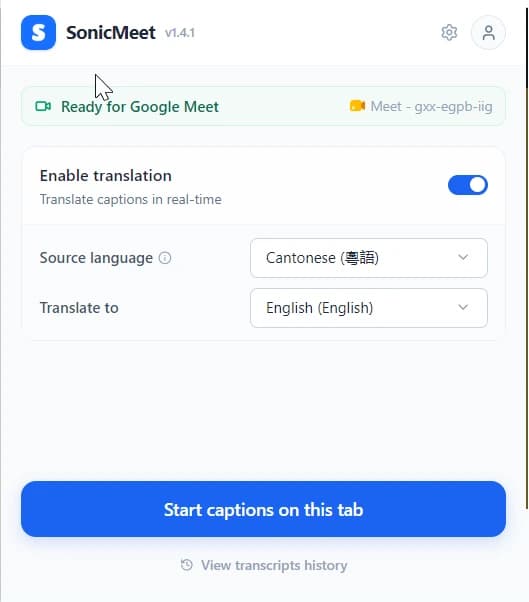
If the meeting is in Cantonese, choose Cantonese (粵語) under Source language. Select it manually because Auto Detect currently hears spoken Chinese as Mandarin.
- 3
Choose what you want to read
For transcription only, leave translation off. To translate into Cantonese, choose Cantonese under Translate to; to translate Cantonese into another language, choose that language as the target.
Pick Cantonese before the call
Read the meeting in written Cantonese, live
Why Cantonese needs its own source and target options
Cantonese is not just Mandarin written with Traditional Chinese characters.
Cantonese is not a written variant of Mandarin. It has its own vocabulary, its own grammar and its own characters. A Cantonese speaker says 佢哋唔喺度 where Standard Chinese writes 他們不在這裡 — same script family, different language. Tools that only offer "Traditional Chinese" hand Cantonese speakers a translation that is readable, but reads like a news broadcast instead of the meeting they're sitting in.
SonicMeet treats Cantonese as a distinct language on both sides. As a source, it recognizes spoken Cantonese; as a target, it produces genuine written Cantonese — the words a Hong Kong colleague would actually type in a group chat:
That's also why Cantonese and Traditional Chinese (Taiwan) are separate source and target options in SonicMeet. The Taiwan option follows Taiwanese Mandarin conventions in traditional script; Cantonese is 廣東話. Pick the language people actually speak or want to read, not just the character set.
Meet in Cantonese — or read another meeting in Cantonese
Hong Kong and Greater Bay Area teams move between Cantonese, English and Mandarin every day. When the meeting is in Cantonese, select it as the source to capture what people actually say. When clients or global teammates speak another language, select Cantonese as the target to follow the same discussion in familiar wording.
The same flexibility helps Cantonese-speaking communities overseas — in Vancouver, Sydney, London and the Bay Area — as well as customer-facing teams serving Hong Kong. One language option now covers both sides of the conversation: understanding Cantonese speech and producing Cantonese captions.
Cantonese transcription and translation FAQ
Does SonicMeet support Cantonese?
Yes, in both directions. SonicMeet translates live meeting captions into written Cantonese (Traditional Chinese characters with natural Cantonese wording) from any of its 62 source languages — and since Extension 1.4.1 and Windows 1.2.1 it also captions meetings spoken in Cantonese.
Can SonicMeet transcribe a meeting spoken in Cantonese?
Yes, since Extension 1.4.1 and Windows 1.2.1. Pick Cantonese (粵語) as the Source language and SonicMeet captions the Cantonese speech, then translates it into whichever target language you choose. One thing to know: Auto Detect hears spoken Chinese as Mandarin, so a Cantonese meeting needs the source language set manually.
What's the difference between Cantonese and Traditional Chinese (Taiwan)?
Both use Traditional Chinese characters, but they represent different spoken and written language conventions. Cantonese recognizes and produces Cantonese vocabulary and grammar. Traditional Chinese (Taiwan) recognizes Taiwan-style Mandarin and produces Standard Chinese following Taiwanese conventions. Choose the option that matches what people are speaking or want to read.
Which platforms can show Cantonese captions?
Effectively all of them. The Chrome/Edge extension captions any meeting that runs in a browser tab — Zoom, Microsoft Teams, Google Meet or any other web-based platform — and since it captions any tab with audio, webinars and recorded sessions work too. The Windows and Mac app additionally covers desktop meeting clients.
Do other people in the meeting need to install anything?
No. Only you need SonicMeet — no bot joins the call, no host settings are required, and nobody else sees your captions. You can use Cantonese captions in a meeting where no one else even knows about SonicMeet.
Transcribe or translate your next meeting in 廣東話
Free to install, sets up in about a minute, and no one else in the meeting has to do anything.